The short answer
To check for AI writing, run the text through an AI detector and read the result for each sentence. Then read the text for the common signs, check that its sources exist, compare it with the writer’s earlier work, look at the drafts and ask the writer. Use all six. No single step is proof.
- Run the text through an AI detector
- Read for the signs of AI writing
- Check that the sources and quotes exist
- Compare with the writer’s earlier work
- Look at drafts and version history
- Talk to the writer
The 6 steps
The steps go from fastest to slowest. The first two take minutes and tell you whether the rest is needed. You can stop early when nothing looks unusual.
1. Run the text through an AI detector
Paste the text into an AI detector. The Plagiarism Checker Plus AI detector gives an overall AI score and a likelihood for every sentence. The first check is free without sign-up, up to 1,000 words. For text you think came from ChatGPT, the ChatGPT checker does the same job.
Read the sentence results, not only the overall number. Ask three questions:
- Where are the high-scoring sentences? Spread across the whole text, or all in one section?
- What kind of sentences are they? A definition, a formal opening line or a quoted rule can score high for ordinary reasons.
- How long is the text? A few sentences give a detector very little to measure.
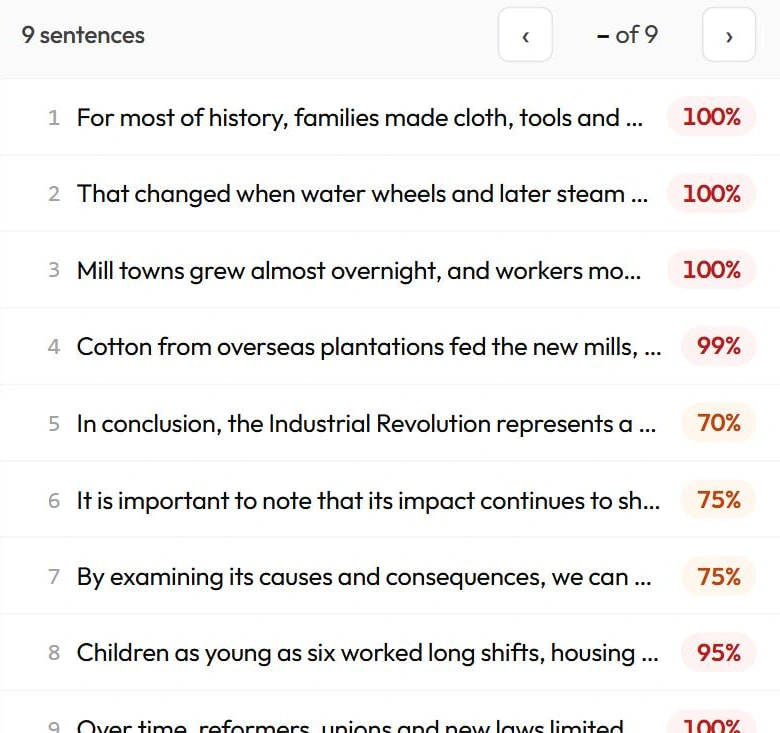
The same overall score can mean different things. One paragraph of high-scoring sentences in an otherwise low-scoring essay is a different case from an even spread. To understand what is being measured, read how AI detectors work.
2. Read for the signs of AI writing
Now read the text yourself, starting with the sentences that scored high. Look for an even rhythm, general claims with no specific detail, a balanced structure that takes no side, and the same transition phrases again and again. Note each sign and where you saw it.
The full list, with an example of each, is in how to tell if something is written by AI: 12 signs. People write this way too, so a sign is a note to follow up, not a result.
3. Check that the sources and quotes exist
This is the step that produces a fact instead of an impression. AI tools can invent references. One study of references produced by ChatGPT found that 55% of the citations from GPT-3.5 and 18% from GPT-4 were fabricated. Those were older models, but the check is the same today.
- Search for the exact title of each reference.
- Check that the author, the journal and the year match.
- Open the source and confirm it says what the text claims.
- Search for each direct quotation in quotation marks.
A source that does not exist is a real problem whoever wrote the text. It still does not prove AI use. People also copy references they have not read and misremember titles.
4. Compare with the writer’s earlier work
Put the text next to something the same person wrote before: an earlier essay, emails, in-class writing or past articles. Compare three things.
- Word choice. Are there many words this writer has never used?
- Sentence length. Has it become much longer or much more even?
- Usual mistakes. Have this writer’s regular spelling or grammar habits disappeared?
A change is a question, not an answer. Writers improve, get help from a tutor or an editor, and write differently about subjects they care about. If you have no earlier writing, skip this step. Do not guess.
5. Look at drafts and version history
Writing leaves a record. Google Docs and Microsoft Word keep a version history that shows when text was added and how it changed. Notes, outlines and saved drafts show the same thing.
Text that grew over several sessions, with deletions and rewrites, looks different from a finished text that appeared in one paste. One paste is not proof either. Some people draft in another app, on paper or on a phone. Ask where the drafting happened.
6. Talk to the writer
Do this before you decide anything. A person who wrote a text can usually explain it. Ask open questions and let them answer:
- How did you get to this argument?
- Why did you choose this source, and what else does it say?
- Which part was hardest to write?
- What would you change with more time?
Show the writer what you found and ask them to respond. Keep it a conversation. Nervous people explain things badly, so one weak answer is not proof.
What the evidence adds up to
Each step gives one piece of evidence. What matters is how many pieces agree.
| What you found | What it supports |
|---|---|
| A high score and nothing else | Not enough to act on. Record it and move on, or ask a neutral question. |
| A high score, several signs and a clear change of voice | A reason to ask for drafts and talk to the writer. |
| Sources that do not exist | A problem to raise in itself, whatever the cause. |
| A low score and no other concern | No reason to go further. A low score is not proof of human writing either. |
Keep the limits of detection in mind while you weigh it:
- An independent test of 14 detection tools in 2023 concluded that they were neither accurate nor reliable, and that they leaned towards labelling text as human-written.
- A 2023 study found that AI detectors consistently misclassified writing by non-native English writers as AI-generated. Take extra care with writers working in a second language.
For more on wrong results, see AI detector false positives. On thresholds, see what percentage of AI is acceptable?
For teachers
- Say what is allowed first. You can only check against a rule the class has been given.
- Use the score to choose what to read. It tells you which submissions and which passages need a closer look. It does not decide the outcome.
- Ask for the process. Drafts, notes and version history are stronger evidence than any score.
- Follow your institution’s procedure for anything formal, and keep notes of what you saw and what the student said.
We cover the teacher’s side in full in how do teachers check for AI?
For editors and content teams
- Put your AI policy in the brief. Writers should know what use is allowed and what they must disclose before they start.
- Check at intake. Run each draft through an AI detector before editing begins, and read the sentence results.
- Fact-check harder than you score. Invented statistics, quotes and sources are the real risk to a publication. Step 3 matters most here.
- Ask for the working files. Interview notes, an outline or a document with version history answer most questions quickly.
- Talk before you reject. A long-standing writer with one high score deserves a question, not a cancelled contract.
Teams that check many drafts can send text to the Plagiarism Checker Plus API and get an AI result for each sentence back. There is also a Google Docs add-on and a Chrome extension.
For students checking your own draft
- Run your own check before you submit. You will see which sentences might be flagged, so the result is not a surprise.
- If you wrote a flagged sentence yourself, leave it. Do not damage good writing to change a number. Keep your evidence ready.
- Write in a document with version history and keep your notes, outline and sources.
- Check your own references. If any tool helped you find sources, confirm that each one exists and says what you claim.
- Disclose AI use your course allows. If you are not sure what is allowed, ask before you submit.
Your school may use a different tool, so its result may not match the one you see. If your work is flagged and you wrote it yourself, read how to prove you didn’t use AI.