How to Cite a Source From a Plagiarism Match
Updated
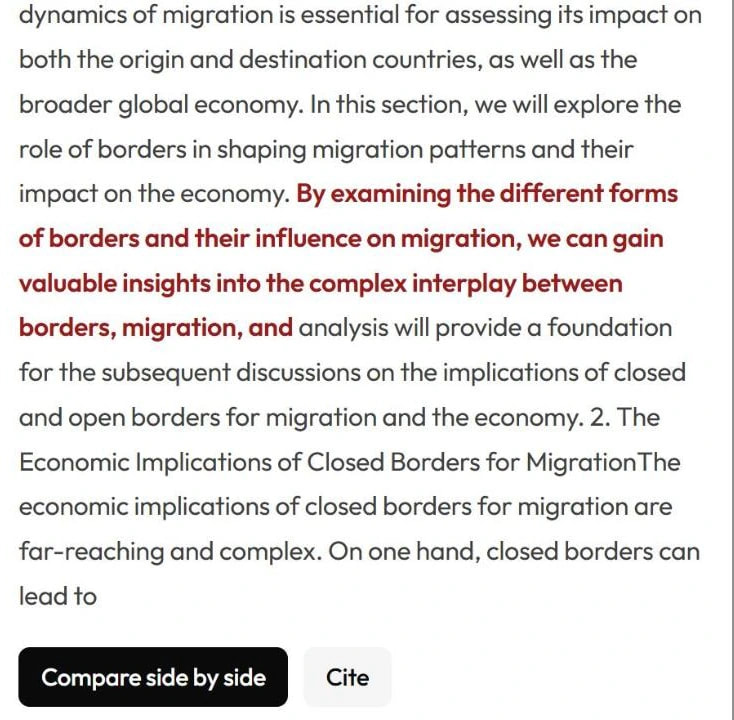
In your plagiarism report, click the match, then click Cite under the source’s text. The citation generator opens, looks up the matching page and adds a citation for it to your most recently updated citation project (or a new one if you don’t have any). Choose your style, check the details and click Copy to paste the citation into your paper.
Cite a source from a plagiarism match
- Open the report and go to the Plagiarism tab.
- Click the match you want to cite — in the list, or on the underlined passage in your text.
- Click Cite, next to Compare side by side.
- The Citations page opens and looks up the page. When you see Citation added, the source is in your project.
- Change the Style menu if you need a different style. Every citation in that project switches to it.
- Click Edit on the citation to fix the title, authors, date or anything the page didn’t provide, then click Update citation.
- Click Copy and paste the entry into your reference list. Add the in-text citation in your sentence as well.
If the details can’t be looked up
Some pages don’t publish their details in a way the generator can read. If you see Could not fetch metadata — try adding manually below., choose Website under or add manually by source type and fill in the details yourself, using the page address from the match. More in How to create citations in the citation generator.
Citing isn’t always the whole fix
- Copied wording needs quotation marks as well as a citation.
- A close paraphrase should be rewritten in your own words and structure — and still cited.
- Cite the original. A match can point to a site that copied the text from somewhere else. If the page quotes another author or publication, cite that original source instead.
- Common phrases and short technical terms usually don’t need a citation at all.
Not sure what a match means? See How to read your plagiarism report. In Google Docs™, the add-on has its own Cite button next to each match — see How to add citations in Google Docs.