How to Check an Essay for AI Writing in the Web App
Updated
Sign in at app.plagiarismcheckerplus.com, click AI Detector in the left sidebar, paste the essay into the editor and click Scan now — AI Detection is switched on in Scan options. The report shows an overall AI score, tints each sentence in your text by how likely it is to be AI-written, and lists every sentence with its own percentage.
Check an essay for AI writing
- Sign in at app.plagiarismcheckerplus.com. You need a free account with a confirmed email address.
- Click AI Detector in the left sidebar. The editor opens with AI Detection switched on.
- Paste the essay into the editor (Ctrl+V, ⌘V on a Mac, or Paste text). It needs at least 50 words.
- In Scan options, check that AI Detection is on. Switch Plagiarism on too if you want both checks — each one uses words from your allowance.
- Optional: under Exclude, switch on Quoted text so long quotations from other authors don’t affect the result.
- Click Scan now, then open the AI Detection tab in the report.
Reading the AI results
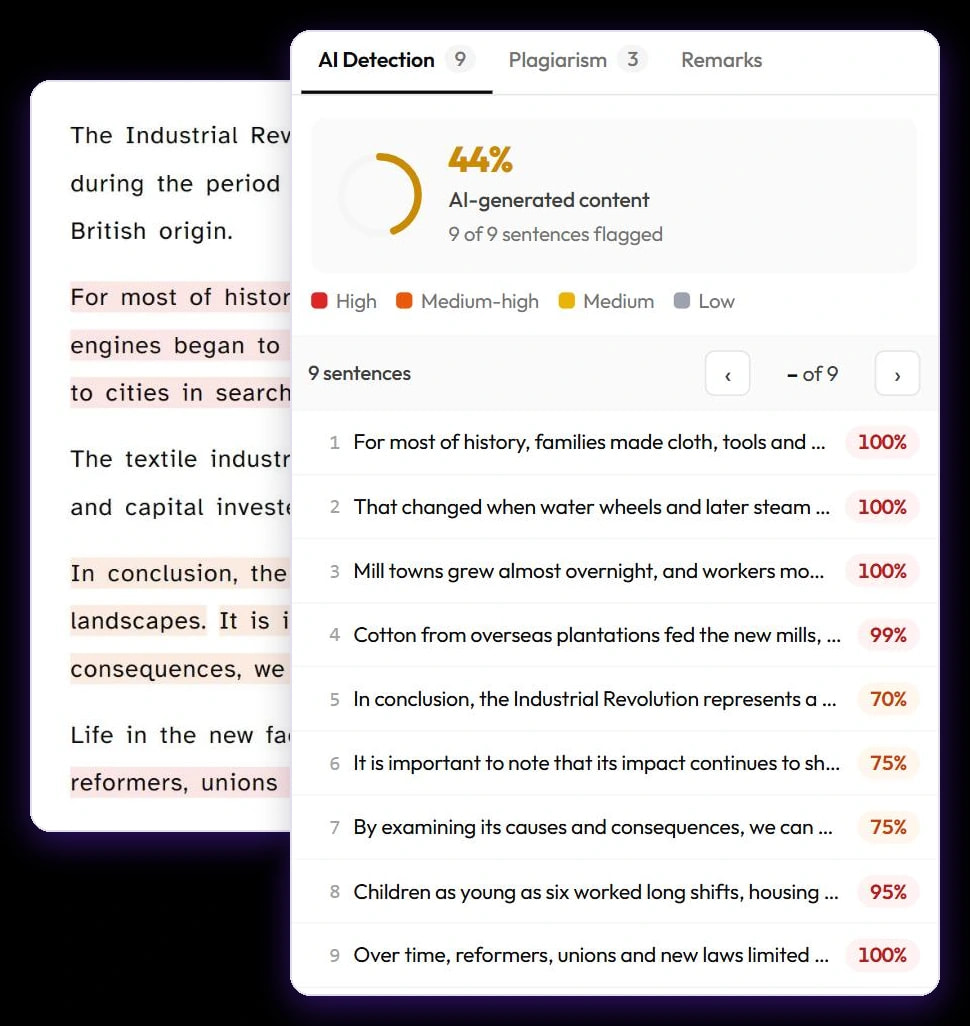
The score card at the top gives the overall AI score — for example 44% AI-generated content — and how many sentences were flagged, such as “9 of 9 sentences flagged”. A sentence counts as flagged when the detector rates it at 40% or more. The colour key below the score explains the tints in your text:
- High — 80% and above.
- Medium-high — 60–79%.
- Medium — 40–59%.
- Low — under 40%.
Every sentence is listed in order with its percentage. Click one to select it in your text and see it on its own; step through them with the ‹ and › buttons or the J and K keys, and go back with ‹ All sentences. If a sentence also matches a plagiarism source, it says Also matches and names the site. Very short sentences show Too short to judge and aren’t scored.
Add an AI check to an existing report
If you ran only a plagiarism check, the AI Detection tab says AI Detection not run. Click Run AI Detection to check the same text again with AI detection switched on. This runs a new scan, so it uses words again.
Keep the score in perspective
For what the numbers mean, see How to read your plagiarism and AI scores. You can also try the free AI detector on our website, or check a Google Doc™ in place with the Google Docs add-on.