How to Check a Document for Plagiarism in the Web App
Updated
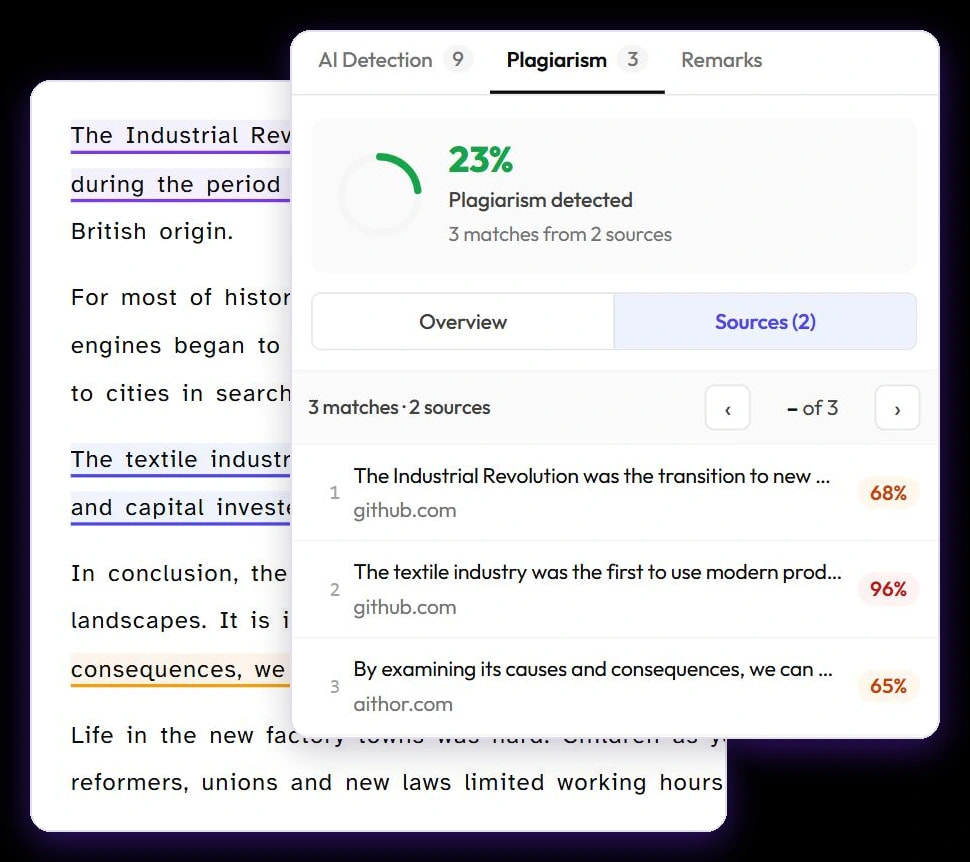
Sign in at app.plagiarismcheckerplus.com, click Plagiarism in the left sidebar and paste your text into the editor. In the Scan options panel, make sure Plagiarism is switched on, then click Scan now. The report opens straight away and fills in when the check finishes, with every matching source listed next to your text.
Before you start
- A free account. The web app opens once you’ve signed up and confirmed your email address. Just want to try it? Without an account you get one free plagiarism check and one free AI check (up to 1,000 words each) on our homepage.
- At least 50 words. Shorter text doesn’t give the checker enough to work with.
- Words in your allowance. A plagiarism check uses one word for every word checked. See How word usage works.
Check a document for plagiarism
- Sign in at app.plagiarismcheckerplus.com.
- Click Plagiarism in the left sidebar. The editor opens with the Plagiarism check switched on. (New check at the top of the sidebar opens the same editor.)
- Paste your text into the editor with Ctrl+V (⌘V on a Mac), or click Paste text. You can also type or edit the text right there.
- In Scan options on the right, check the switches: Plagiarism on, plus AI Detection if you want both checks in one report. The Document card shows your word count.
- Optional: under Exclude, switch on Quoted text and/or Reference list so correctly quoted passages and your bibliography aren’t checked or counted.
- Optional: choose a folder under Save to folder to file the report as you go.
- Click Scan now. The report page opens and shows progress while your text is compared with other sources. Long documents can take a few minutes.
If the scan won’t start
- Select AI Detection or Plagiarism to scan — both switches are off. Turn at least one on.
- Minimum 50 words required for scanning — add more text. Excluded quotes and references don’t count towards the 50.
- Maximum … words per scan on your plan — the text is longer than your plan allows in one check (3,000 words on Free, 10,000 on Student, 25,000 on Personal and Team). Check it in parts, or see the pricing page.
- Insufficient words — you don’t have enough words left this month for the checks you picked. Turn one check off, or upgrade or top up.
Uploading files
The editor’s Upload File tab is marked Soon: uploading PDF, DOCX or TXT files, importing from cloud drives and bulk upload aren’t available yet. For now, open your file, copy the text and paste it into the editor. To check grammar, spelling and punctuation, use Check grammar in the Grammar section at the top of Scan options, or the free grammar checker on our website.
After the check
Work through the matches as described in How to read your plagiarism report. Every report is saved to your account, under Reports and My documents in the sidebar, so you can come back to it, share it or download a PDF later.
- On a phone or narrow window, Scan options and the results open from a floating button instead of sitting beside the text.
- Failed checks are refunded. If a check can’t finish, the words it used are returned automatically.
- Writing in Google Docs™? Check the document in place with the Google Docs add-on.